
Automation of Calculator Block Parameter Modification in Aspen Plus Using VBA
Project Description
This project focuses on automating the modification of constant values in Calculator Blocks within Aspen Plus using VBA and ActiveX interfaces. In process simulations, Calculator Blocks are commonly used to define mathematical relationships, multipliers, or design specifications. Manual modification of constants can be time-consuming, error-prone, and inefficient, especially when the constants are involved in multiple calculations, design specifications, or sensitivity analyses. Automating this process ensures consistency, saves time, and reduces the risk of human error.
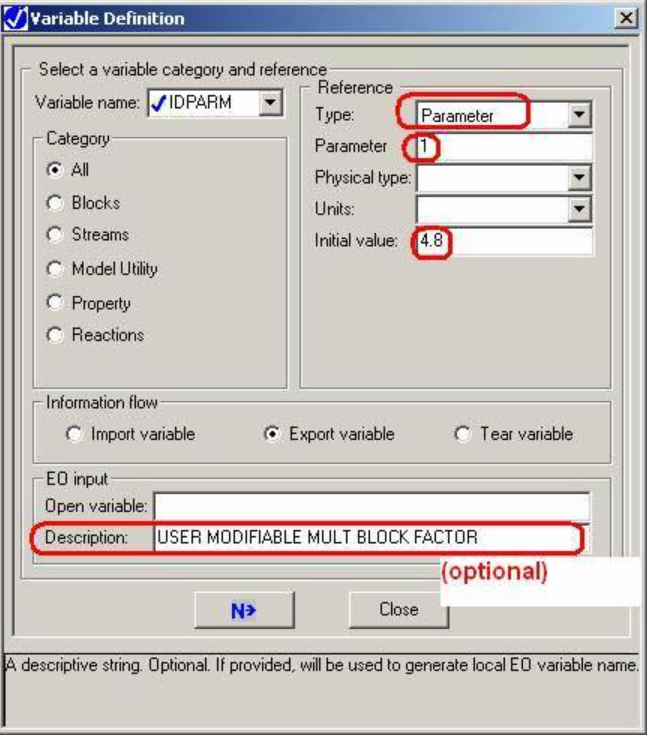
The standard approach of editing Fortran code directly in Calculator Blocks is prone to disruption, as changes can be overwritten or invalidated if the user modifies the block later. To address this limitation, a more reliable method is implemented by defining constants as PARAMETER-type variables in the Calculator Block’s DEFINE form. These parameters can then be accessed and modified via VBA code, allowing seamless integration with external spreadsheets or user inputs.
The project demonstrates the implementation of this approach, linking an Excel spreadsheet to Aspen Plus through VBA. Users can input new values for the constants, which automatically update the Calculator Block parameters, propagating through the simulation to update multipliers, stream calculations, and other dependent blocks. This framework supports dynamic process control, sensitivity studies, and design optimization in Aspen Plus, providing engineers with a powerful tool for efficient process management.
Process Flow Diagarm
Optimization Strategy
The optimization strategy aims to maximize simulation efficiency and accuracy by automating parameter updates while maintaining the integrity of calculations across multiple Calculator Blocks. By using PARAMETER-type variables, the workflow ensures that changes to constants are consistently applied throughout the flowsheet without disrupting the Fortran code logic. The approach also allows for bulk updates through external inputs, minimizing manual intervention and reducing the likelihood of human errors in repeated or complex simulations. Additionally, the integration with Excel via VBA provides a flexible interface for sensitivity analysis and process optimization. Users can test multiple scenarios by adjusting input values, instantly observing the impact on process streams, multipliers, and calculated outputs. This method supports performance evaluation, faster decision-making, and optimization of process design variables in real-time, offering a scalable solution for industrial process modeling and control.
Parameter Definition and VBA Integration
PARAMETER-type variables are declared in the Calculator Block’s DEFINE form. These variables are assigned initial values and configured to EXPORT information, preventing accidental overwrites by other blocks during simulation runs. VBA code is then used to link these parameters to user input values in Excel, enabling automated updates and direct control over the simulation
Multiplier Block Control
The project uses a practical example where multiple multiplier blocks are connected to product streams. VBA code adjusts the factor in each multiplier based on the defined PARAMETER variable. This ensures that product stream calculations are consistent and dynamically updated according to user-specified input values, enhancing simulation flexibility and control.
Error Minimization and Reliability
By avoiding direct edits to the Fortran code, this approach reduces the risk of unintended errors and non-defined behavior. The PARAMETER-based workflow ensures that updates are safe, reliable, and repeatable, even when multiple users or simulations are involved. This strategy improves confidence in simulation results and simplifies workflow management for complex Aspen Plus models.
Projects Insight
Efficiency Gains
○ Automation reduces manual parameter entry.
○ Minimizes human errors in repeated calculations.
○ Speeds up simulation updates and sensitivity analyses.
Consistency Across Simulation
○ PARAMETER-type variables ensure uniform application.
○ Updates propagate to all dependent Calculator Blocks.
○ Prevents discrepancies from direct Fortran edits.
Flexibility for Optimization
○ Excel integration allows batch updates of multiple constants.
○ Supports rapid scenario testing.
○ Enables real-time decision-making and process optimization.
Enhanced Control of Multipliers
○ Multipliers dynamically adjust based on PARAMETER values.
○ Simplifies management of complex stream calculations.
○ Provides clear visualization of input-output relationships.
Scalability for Large Flowsheets
○ Can handle multiple Calculator Blocks and interconnected streams.
○ Easily expandable for future simulations.
○ Supports industrial-scale Aspen Plus models.
Risk Reduction
○ Eliminates accidental code modification errors.
○ Reduces chances of non-defined behavior in the simulation.
○ Enhances reliability of simulation results for engineering decisions
Conclusion
This project presents a professional methodology for automating the modification of constants in Calculator Blocks using PARAMETER-type variables and VBA integration. By linking Aspen Plus to Excel, engineers can efficiently update constants, perform sensitivity analyses, and optimize process performance without directly editing Fortran code. This approach improves reliability, consistency, and scalability, providing a robust framework for dynamic simulation control, process optimization, and industrial engineering applications.